Security Insights
CI/CD Watch reads your existing pipeline configuration and tells you which security controls are running, which are missing, and what to add. We do not run scanners ourselves, we surface what is and isn't present in what you already have, and recommend a copy-pasteable workflow when a control is missing.
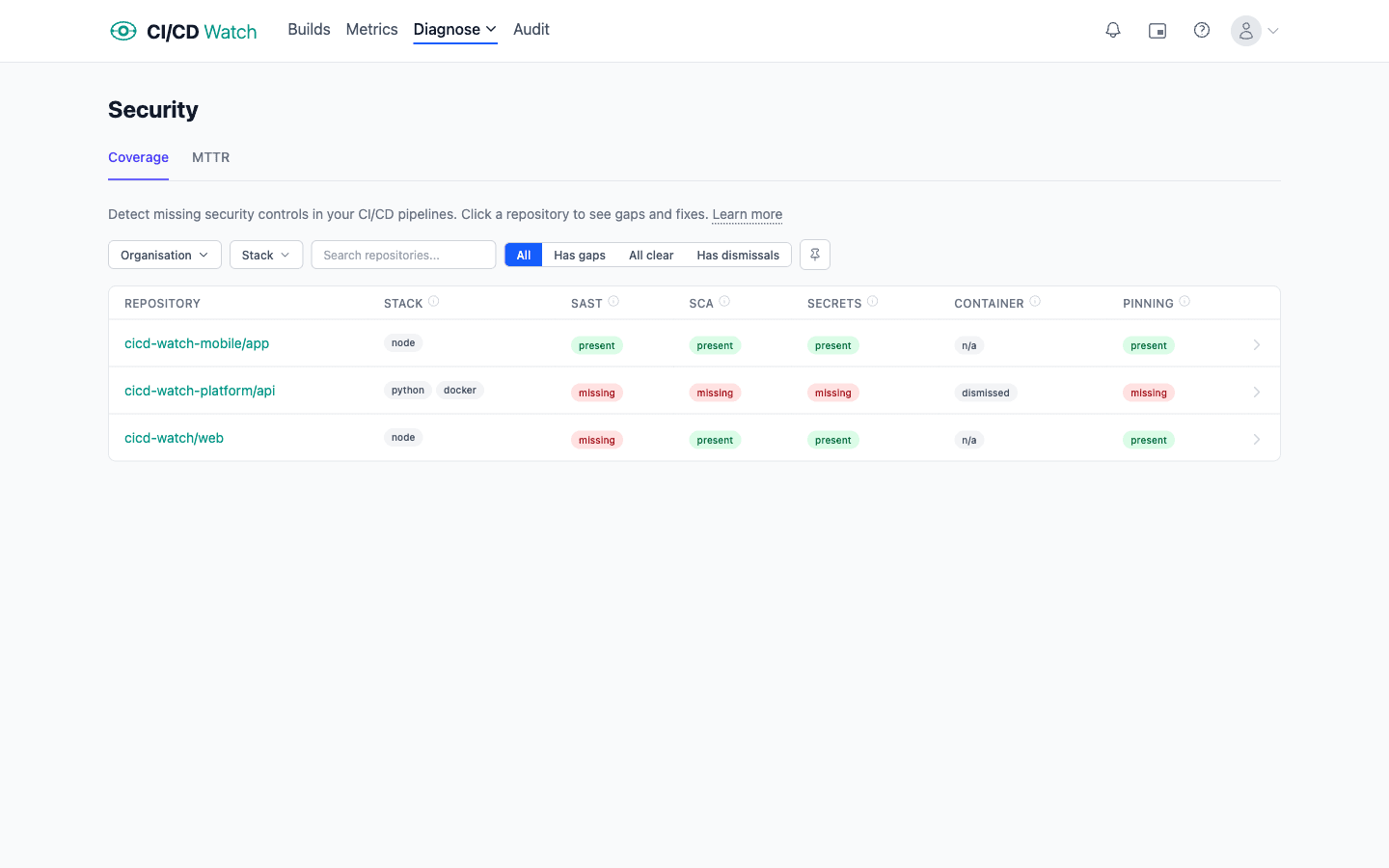
What we detect
We track five control categories per repository. Each maps to a class of vulnerability the control is designed to catch.
| Control | What it means | Tools we detect |
|---|---|---|
| SAST | Static Application Security Testing. Detects code-level vulnerabilities (injection, unsafe deserialisation, hard-coded crypto) before they ship. | CodeQL, Semgrep, SonarCloud, SonarQube |
| SCA | Software Composition Analysis. Flags known CVEs in your dependencies (npm packages, Python packages, container layers). | npm audit, pnpm audit, yarn audit, pip-audit, safety, Snyk, Trivy (filesystem), Dependabot |
| Secrets | Catches credentials (API keys, tokens, private keys) accidentally committed to the repository. | gitleaks, trufflehog, GitGuardian |
| Container | Scans the built container image for OS-level and application CVEs before deployment. | Trivy (image), Anchore, Docker Scout, Snyk (Docker) |
| Pinning | Flags third-party GitHub Actions referenced by branch (e.g. @main). Branch refs are mutable; if the action is compromised, your CI runs the attacker's code on the next push. SHA pins are immutable and unaffected. | N/A, quality check on every uses: reference, not a tool. First-party actions ( actions/*, github/*) are allowlisted. |
What each status means
| Status | Meaning |
|---|---|
| Present | We found at least one step running this control. Hover the status on the per-repo page to see which tool and which workflow file. |
| Missing | The control applies to this repo's stack but we found no step running it. The per-repo page shows a recommended workflow snippet you can paste in. |
| N/A | The control does not apply to this repo's detected stack. Container scanning, for example, is N/A on a repo without a Dockerfile. |
| Dismissed | You marked the control as handled elsewhere (in a reusable workflow, by an external tool, or as risk-accepted). Dismissed controls don't count against the “Has gaps” filter. |
| Unknown | No assessment has been computed yet. This usually clears on the next sync, or you can click Re-assess on the per-repo page. |
How detection works
We do not call extra APIs or pull additional data from your provider for security insights. Detection runs against the workflow YAML we already fetch when computing your pipeline configuration. After every configuration sync we look at each repository's GitHub Actions workflows and apply a set of rules:
- Action-based rules match a step's
uses:entry against a known security-tool prefix (for example,github/codeql-action/means SAST is present). - Run-based rules match shell commands inside
run:blocks (for example,npm auditorpip-audit). - Stack detection looks for
setup-node,setup-python, or Docker actions to decide which stack-specific recommendations apply. - Dual-purpose tools like
aquasecurity/trivy-actionare disambiguated by theirscan-typeinput,imageclassifies as container scanning, anything else as SCA.
Coverage caveats
Control detection covers GitHub Actions and Azure Pipelines. GitLab CI, Bitbucket Pipelines, CircleCI, and Jenkins are not yet inspected for missing controls. If most of your security runs in a reusable workflow that we don't see, or in a separate tool entirely (Jenkins job, third-party SaaS, GHAS default setup), use the Dismiss button to mark the control as handled elsewhere with a reason, that suppresses the gap without lying about coverage.
Recommendations
When a control is missing, the per-repo page shows a copy-pasteable workflow file you can drop into .github/workflows/. The recommendation is chosen based on the detected stack, for example, Node repos missing SCA get an npm audit snippet, Python repos get pip-audit.
Templates ship with sensible defaults: pinned action versions, a real gate (no continue-on-error), and severity thresholds set to high. We do not open pull requests for you, the recommendation is yours to paste, review, and merge.
Security MTTR
Once your pipelines start emitting scanner output, the /security/mttr page reports P50 and P90 MTTR (mean time to remediate) by severity across the org, plus a per-finding table showing first-seen, resolved, and elapsed time. The metric answers a question DORA on its own can't: how fast are real CVEs flowing from disclosure to fix-deployed?
We pull findings from four sources, in this order:
- Pipeline artifacts, any SARIF, npm-audit, or pip-audit JSON your CI run uploads as an artifact. The recommended templates above already do this. Works on GitHub, Azure DevOps, and GitLab.
- GitHub Advanced Security, open Dependabot, Code Scanning, and Secret Scanning alerts are pulled directly from the GitHub API. Free for most GHAS-on tenants; no extra setup.
- SARIF uploads to GHAS, if your scanner uploads to GitHub Code Scanning (e.g. via
github/codeql-action/upload-sarif), we read it back through the Code Scanning API.
MTTR is derived by diffing per-run snapshots. A finding becomes resolved the first time it disappears and stays gone for ≥1 subsequent run, that flap protection avoids transient scanner failures resetting the clock. Customers without any scanner running see no MTTR data; the gap is reported by the control-detection flow instead, with a recommended template to add the missing scanner.
The same metric is also surfaced per repository, the per-repo security page shows P50 and P90 alongside the control checks, so “is THIS repo getting better?” is answerable without leaving the page.
Plan availability
Security insights, both control detection and MTTR, are available on the Business and Enterprise plans.
Related
- DORA Metrics , the broader delivery-performance signals security insights sit alongside.
- Deployment Detection , how we identify which pipeline runs are deployments.
- CI/CD Watch for DevSecOps , the long-form pitch for the audience using these checks.